
Field Notes from 22 to 30 September 2026. All times are UTC; our customers’ local time was four hours behind.
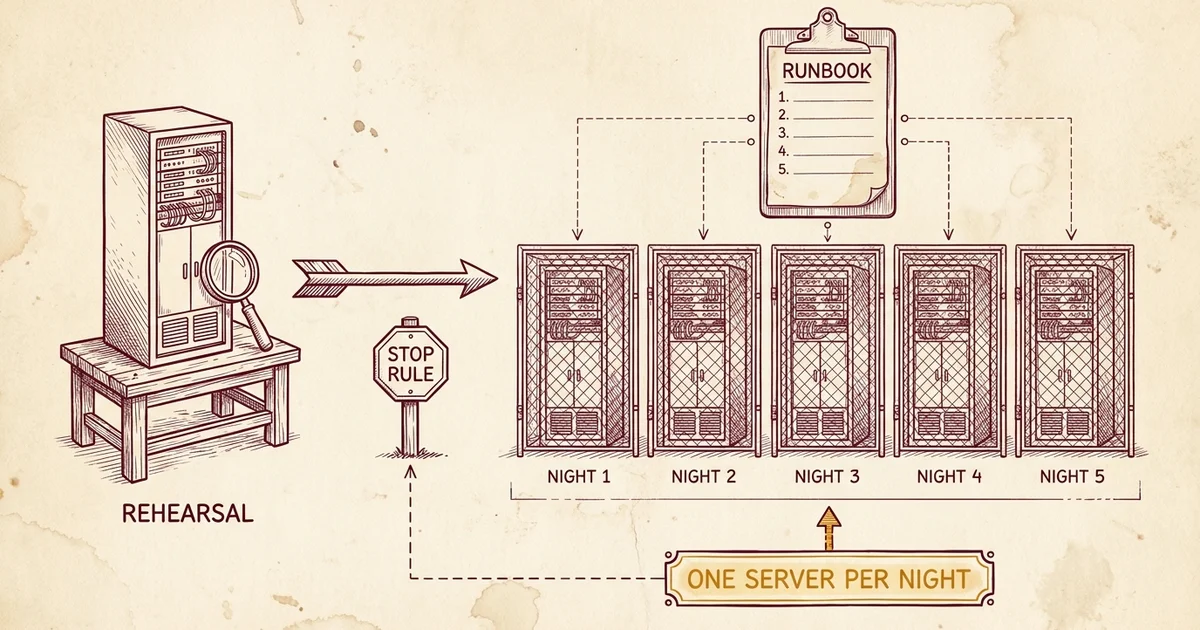
This morning at 07:52 the last of the servers that host our customers’ websites finished its move to CloudLinux. Five servers converted in six days, one a night, each in a window announced days ahead. The sixth server, which runs our own billing and management tools, goes on Friday 2 October. This post is about how the move was done. What it makes possible for the sites we host is in the launch post, What CloudLinux Makes Possible: An AI Builder on Every Plan.
Why we moved
We wanted to give each site’s developer SSH and SFTP access to that site. Command-line AI agents turned that from a nice-to-have into something developers ask about before they choose a host.
Our isolation until now was LiteSpeed Containers, which walls off the web server’s PHP processes and nothing else. An SSH session on the same server would have seen every account’s directory names and the full set of system programs, compiler and sudo included. CloudLinux’s CageFS applies its walls to every process an account runs, SSH sessions included.
The two cannot run side by side. LiteSpeed’s own documentation says so. So the move was a replacement: everything Containers did for us, including per-account memory caps and each site’s own Redis cache, had to be rebuilt on the CloudLinux side before a single customer server converted.
A rehearsal server, converted twice
On 22 September we built a disposable server and converted it before touching anything a customer uses.
The first conversion ran at 07:30 on a bare copy of the operating system our servers run. It passed all seven isolation tests. Then we measured the two ways back. Reversing the conversion in place took 112 seconds and produced a server that called itself the old operating system, still ran CloudLinux’s kernel, isolated nothing, and still printed resource limits that applied to nobody. The real way back is restoring the disk from a backup, which took about four and a half minutes.
That restore taught the week’s most useful lesson. The disk came back and the server booted, and the admin account could not log in. We traced it to a single SSH setting. Every production server already had it set the safe way, and checking it became a step before any production backup was taken. A backup that restores and a backup you can get back into are two different claims, and only the second one is a rollback.
Then we rebuilt the same server to match a production server as closely as we could measure: the same operating system release, Plesk on its own licence, LiteSpeed Enterprise on the version production runs, the same PHP handler, Redis for each site, two WordPress sites and our own configuration bundle. We took a backup of that state and converted it again, end to end, with a stopwatch. From pre-check to serving pages took about 32 minutes, and 29 of those could not be interrupted or shortened. KernelCare, which applies kernel security patches without a reboot, was proven on the new kernel there too. That server is still running this morning, and it goes once the last server has converted.
Alongside it we built a second throwaway server from a bare CloudLinux image, using nothing but our written procedure for provisioning a new server: Plesk, MariaDB, LiteSpeed, Imunify360, Warden anti-spam with Spamhaus reputation checks and our paid virus signatures, DNS and the offsite backup setup. We compared 159 sections of its configuration against a production server and folded the gaps it found back into the procedure. A standard test virus sent to it by email was refused at the door. It is also still running.
What the rehearsal caught
Every item here was found on the rehearsal server and written into the runbook before the first customer server converted:
-
Each site's Redis connection moves on its own.
At conversion the socket's path changes. That is correct vendor behaviour, and it broke 26 of our own tooling files that assumed the old path. Every one had to handle both paths before the first production conversion.
-
Switching isolation on for everyone can lock out an admin silently.
We reproduced it with a test account, which failed to log in with no message on either side. The admin account is spared by exactly one group membership, so that membership and a working console password became preconditions.
-
The web server waits for CageFS at boot.
Between installing CageFS and building its file tree, the server is up, SSH works, no service reports a failure, and every site is down. So recovery is measured by requesting a page from a site.
-
CageFS blocks some system messages for non-root services.
On the rehearsal it caught Plesk's own service account, and the write-up named our metrics exporter as the likeliest casualty in production. On the first production server the stop rule fired on exactly that. From the second server on, the fix was a numbered step.
Reboots before conversions
Three servers had not restarted in 166 to 282 days. A first boot after that long surfaces anything configured but never saved, so each got a plain restart first, with no other change, to keep that out of the conversion window. That rehearsal found that our uptime monitor’s tool ended a maintenance window by leaving every check switched off. The fix records which checks were on before a window and switches exactly those back on, and it was proven on a second restart before a customer server went through it.
The canary and the schedule
We had three ways to pick the first production server: fewest accounts, least revenue at stake, least traffic. They disagreed. Traffic decided it, because the socket move disturbs each site’s cache, and the quietest server by traffic moved about a twenty-eighth of the data the next candidate did.
The canary converted on Friday 25 September and soaked for about 45 hours, across a business day and a weekend, before the go/no-go check at 05:00 on Sunday. After that it was one server per night, each only after the previous one had passed its own check at 05:00 the next morning: Sunday, Monday, Tuesday, and this morning. Every window ran 06:00 to 09:00, which is 02:00 to 05:00 for customers in both the Caribbean and the US East Coast. One morning was kept clear for a customer’s own site cutover.
The schedule
-
Rehearsal, converted twice
-
Canary, about 45 hours of soak
-
One server a night
-
The sixth server
The notices
Every server got its own email to the customers on it, sent at least three days before its window. Each was approved by a person before it went and copied to our own account, so we received what customers received. Before each send, the recipient list was checked against our own record of which sites live on which server. That check found a site billed against the wrong server, and the billing record was corrected before the notice went out.
The notice promised a window, about 30 minutes of website downtime inside it, email unaffected, nothing for the customer to do, and SSH and SFTP on request afterwards. A postponement notice was written in case the stop rule halted the rollout after a notice had gone. It was never needed.
One window, as it ran this morning
-
A backup of the whole disk was online ten seconds after it was requested: the way back.
-
Our monitoring went into a maintenance window covering 42 checks. The conversion tool was downloaded and its checksum matched. Scheduled jobs that would have fired mid-window were paused.
-
The go had two more conditions: a clean nightly backup on the previous night's server, which came in at 06:26:56 with no failures, and one on this server, at 06:39:53, also with no failures.
-
Go.
-
The conversion ran in 10 minutes 44 seconds with zero errors, and the first reboot followed.
-
The web server crashed twice, in the in-between state after the first reboot. The worker running the steps stopped, as the stop rule said to, and reported at 07:10.
-
The call was to continue.
-
Second reboot, SSH back 48 seconds later.
-
CageFS on; resource limits applied to 37 accounts with zero errors; all 30 Redis caches answering on their new path; all 39 site names returning exactly what they returned before; the kernel patching licence confirmed; the paused jobs restored byte for byte.
-
A soak check every five minutes. The 07:40 check failed because a scheduled remount had cleared the memory caps; our own timer put them back two minutes later, and the two clean checks the runbook asks for came at 07:45 and 07:50.
-
Final check clean. The monitoring window closed with all 42 checks back on. No third crash. The backup was never used. The two crash dumps are kept in case LiteSpeed's support team wants them.
Our mail monitoring also caught one message. At the second reboot the mail scanner’s front end started three seconds before the scanner itself, and one internal system notice went through unscanned in that gap. No customer mail was affected. Fixing the startup order on every server is on the list, outside a window.
What this means for a small operator
Rehearsal servers, a canary, a soak, a stop rule that actually stops, and a record of every step to the minute used to belong to companies big enough to have someone who could spend a week on nothing else.
A one-person operation usually had to drop whatever it was doing to put out the fire in front of it.
WebOps is run by one person. Most of the hands-on work in this move was done by AI agents working from written briefs, with a second one checking each claim against the servers before it counted, and the decisions that needed a person went to one, with the evidence and the argument against attached. That is how five production servers got this level of care in six nights.
If you host with us, there is nothing you need to do. If your developer wants SSH or SFTP to your site, SSH and SFTP access on WebOps Hosting covers how to ask for it.
