
Code Snippets Pro is the safe way to add custom PHP, JavaScript, CSS, or HTML to your WordPress site without editing core files or your theme’s functions.php. Every WebOps Hosting plan ships with Code Snippets Pro pre-installed and pre-licensed, so you can drop in tracking scripts, custom hooks, conditional logic, or one-off fixes without touching any code outside of the snippet manager.
Why Use a Snippet Manager Instead of functions.php
Adding code to your theme’s functions.php works, but it has three downsides that catch most clients eventually:
- It disappears on theme switch. Move to a new theme and your custom code is gone.
- It disappears on theme update. Even with a child theme, a botched update can wipe customizations.
- One bad line breaks the whole site. A syntax error in functions.php takes down the front end and wp-admin until someone with FTP/SSH access can fix it.
Code Snippets Pro avoids all three. Snippets are stored in the database, decoupled from your theme, and the plugin runs them through error checking before activating. If a snippet has a fatal error, the plugin disables it and surfaces the error message rather than letting it crash your site.
Where to Find It
In your WordPress dashboard, look for Snippets in the left sidebar. The All Snippets view shows everything you have installed, with type filters across the top (Functions, Content, Styles, Scripts, Conditions) and a Cloud Search tab for browsing pre-built snippets:
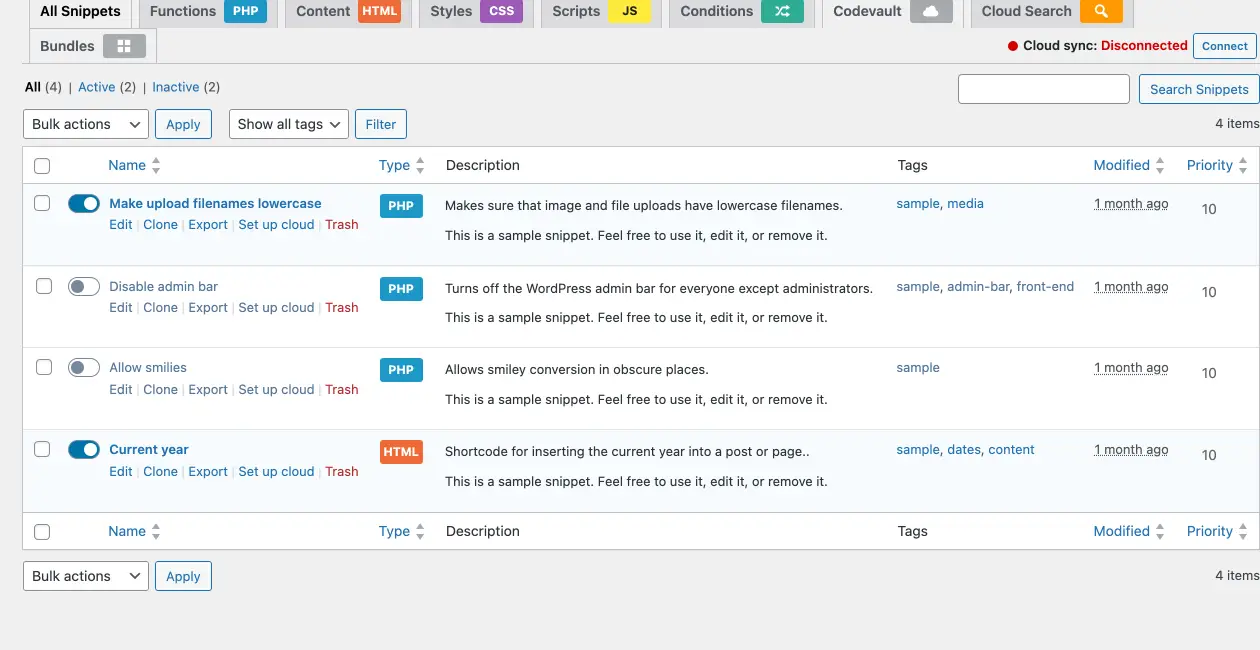
The Snippets list view. Each row has a one-click activate/deactivate toggle, a type badge (PHP, HTML, CSS, JS), tags, modified date, and quick actions (Edit, Clone, Export, Set up cloud, Trash).
What You Can Do With It
Add Tracking and Analytics Code
Drop the Google Analytics, Meta Pixel, or LinkedIn Insight tag into the <head> or <body> of every page without a separate “header scripts” plugin. The “Run snippet everywhere” mode handles this in two clicks.
Customize WordPress Behavior With Hooks
The vast majority of WordPress customizations live in PHP filter or action hooks. Code Snippets Pro lets you paste a snippet directly into the database and activate it, no FTP, no theme editor, no risk of overwriting on update. Examples: change the WordPress login URL, modify the admin bar, customize the dashboard, alter email-from addresses, hook into Gravity Forms or WooCommerce events.
Add CSS Without Touching the Theme
If you need a quick CSS tweak that the theme customizer doesn’t expose, paste it into a CSS snippet and load it site-wide or only on specific pages.
WooCommerce and Membership Customizations
Most WooCommerce tweaks (custom checkout fields, conditional shipping rules, modified order emails) are PHP snippets. Code Snippets Pro is where they live, and the Pro version includes WooCommerce-specific snippet conditions out of the box.
Conditional Loading
Snippets can be configured to run only on specific pages, post types, user roles, login states, or even custom conditions. Useful for “load this script only on the checkout page” or “show this banner only to logged-out visitors.”
The Editor
Each snippet opens in a focused editor with syntax highlighting for the snippet type, status controls, conditional logic, and load-location settings:
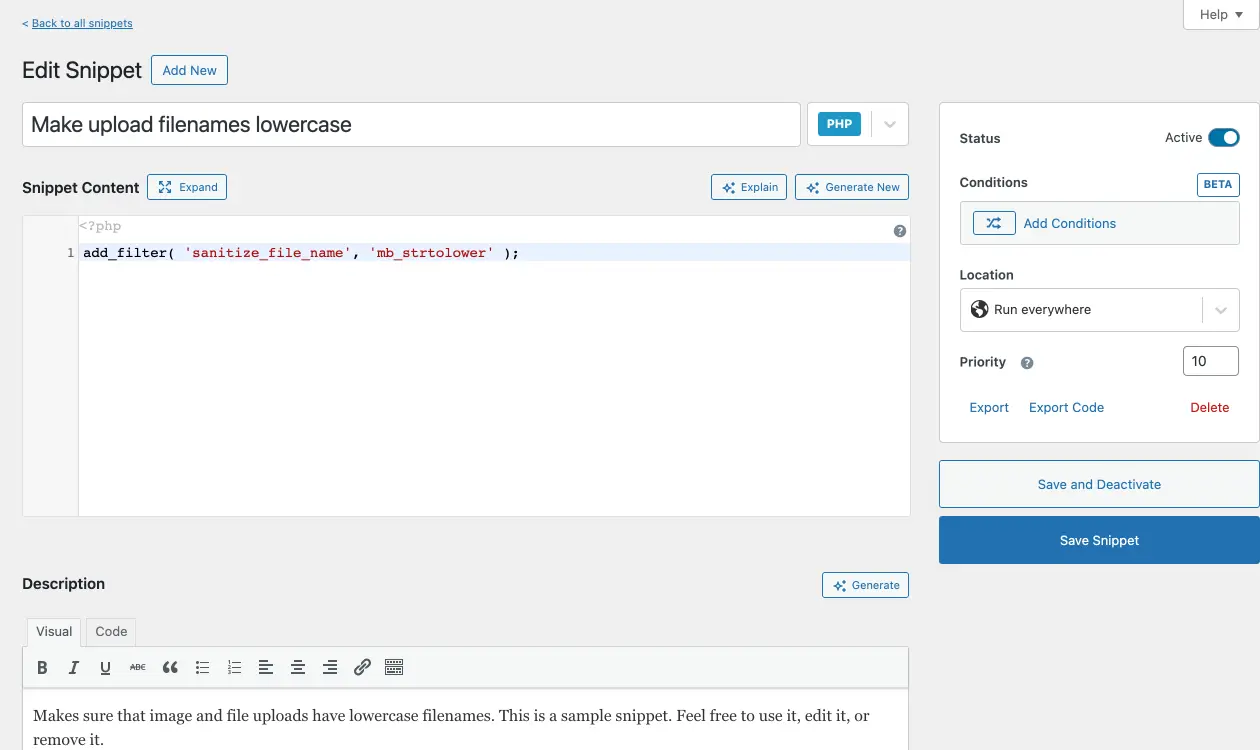
The snippet editor. Set the snippet type with the dropdown next to the title (PHP, HTML, CSS, JS), write your code in the syntax-highlighted editor, choose where it loads (everywhere, admin only, front-end only, on specific posts/pages), and toggle the active state. The Explain and Generate New buttons use AI to help write or document snippets.
Pro Features Included
WebOps clients get Code Snippets Pro (the paid tier), not the free version. The Pro features that matter most:
- Cloud snippets library: hundreds of pre-built snippets you can install with one click for common WordPress, WooCommerce, and Easy Digital Downloads tasks
- HTML and CSS snippet types (free version is PHP only)
- Snippet revisions: every save creates a revision you can roll back to, useful when iterating on a complex hook
- WooCommerce-aware conditions for checkout/cart/product-page targeting
- Snippet sharing across multiple sites via export/import
Code Snippets Pro vs. Editing functions.php Directly
| Code Snippets Pro | functions.php | |
|---|---|---|
| Survives theme switch | Yes | No |
| Survives theme update | Yes | Sometimes |
| Recovers from a bad snippet | Auto-disables broken snippets | Site goes down until manually edited |
| Edit without FTP/SSH | Yes | No (without theme editor) |
| Per-snippet activation | Yes | All-or-nothing |
| Revision history | Yes | No |
| Conditional loading | Built-in | Manual if statements |
Other Snippet Managers
If you have specific developer needs that Code Snippets Pro doesn’t cover (cloud sync of your own snippets across sites, CSS live reload, an IDE-grade editor with deeper hook autocompletion), WPCodeBox is also available on request, included with your hosting.
Frequently Asked Questions
Is it safe to add PHP through Code Snippets Pro?
Yes. Snippets are sanitized at save time, syntax-checked before activation, and auto-disabled if they throw a fatal error. It is far safer than editing functions.php directly because a bad snippet does not take your whole site offline.
Will my snippets survive a plugin update?
Yes. Snippets live in your database, not in the plugin’s files. Updating Code Snippets Pro never touches your snippets.
Can I export my snippets?
Yes. The plugin exports to a standard JSON or PHP file that imports cleanly into another Code Snippets Pro installation. Useful for moving sites or backing up your customizations independently.
Can I disable Code Snippets Pro and use something else?
Of course. Open a ticket and we will swap it for any snippet manager you prefer (WPCodeBox, WPCode, or even no plugin at all). Both licenses we maintain are included.
Questions? Contact us at support [at] webops [dot] host or submit a support ticket. Our team is available 9am-5pm, 7 days a week (24/7 for emergencies).