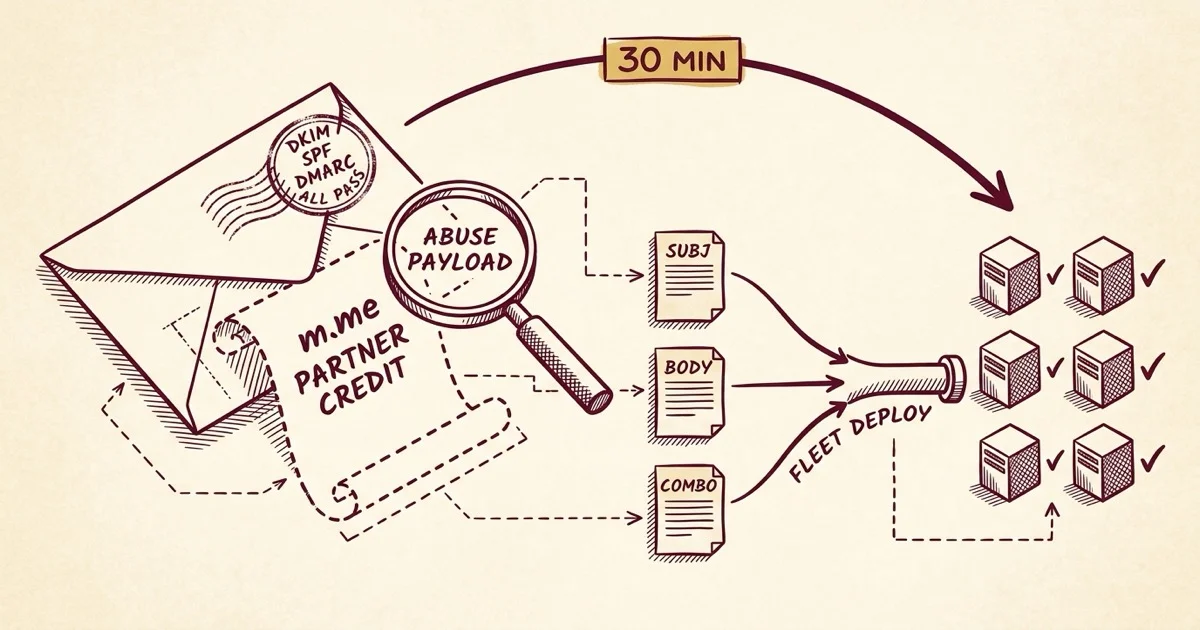
Field Notes from 2026-05-04. One forwarded email. One client asking whether to delete it. Twenty-one near-identical messages quietly sitting across the fleet, all of them sent from inside Meta's own infrastructure. Half an hour later, three filter rules deployed to every mail server we run.
The forward arrived a little before lunch. The subject line was a real Meta Business Manager notification: You've received a Business Manager partner request. The body was the standard Meta template. The whole thing looked native, because it was native. The client wanted to know whether she should just delete it.
The short answer was yes. The long answer is what the rest of this post is about.
When Meta sends the phishing email itself
I expected a typical lookalike-domain phishing send. A slightly off-brand template, a mismatched From header, an IP from somewhere obviously not Facebook. The kind of thing every modern filter catches by lunchtime on the day a campaign starts.
That is not what this was. The headers showed a clean origin in AS32934, Facebook's own autonomous system. The DKIM signature was valid and signed by Meta. SPF passed. DMARC passed. The email was, in every authentication sense, a legitimate Meta notification.
The scam is the partner request itself. Scammers file Business Manager partner requests through Meta's actual system, using fake business names that smuggle the phishing payload directly into the name field: Request Partner Credit Here m.me/1043456655525020, Join the Meta Agency Partner Program m.me/aPartnerplatfomprogram, Meta Partner Credit is Meta's partner network m.me/.... Meta's notification email then dutifully forwards those names to the recipient as the "requesting business," because as far as Meta's notification system is concerned, that is the requesting business name on the partner request record.
The Messenger handle (m.me/...) is the redirect to the actual fraud surface, where the scammer attempts to add the victim's Business Manager account as a partner under their control. The whole thing arrives looking native because it is native. The infrastructure is fine. The content arriving through it is the abuse.
Why our filter let them through
Once we knew what we were looking at, the question became why none of the existing scoring caught it. The answer was a quick decompose of a sample's score: a typical message in this campaign hovered around -0.4 at the gate, which is squarely in ham territory.
The contributing signals all pointed the same direction. BAYES_00 (clean per the trained classifier). DKIM_VALID, DKIM_VALID_AU, SPF_PASS, DMARC_PASS. IP reputation healthy. Every authentication and reputation signal said this is a legitimate Meta notification, because in the strict authentication sense, it was. We have written before about how the spam filter does its work, and this is the kind of edge case the standard scoring stack is genuinely not built to catch.
The one message we did flag across our deferred-spam queue caught only because the destination link inside had already landed on a URI blocklist. URIBL feeds aggregate malicious URLs reported by other operators and let mail filters cross-check inline links during scoring. The other twenty samples in our fleet had arrived before the URIBLs caught up. Standard URI-blocklist lag. Every one of them landed in inboxes.
So the gap was not that the filter was wrong. The gap was that authentication plus reputation plus Bayes can all align in favor of "this is fine" while the actual abuse is encoded in field text the scoring engine was not reading.
The fingerprint
Before we could write a useful rule, we needed to figure out what was distinctive about these particular messages versus a real Meta partner request. We pulled the eight cleanest samples from the affected mailbox and read them.
Two things stood out.
First, the subject line was identical across every sample: You've received a Business Manager partner request. That alone is not enough to act on (legitimate Meta partner requests use the same subject) but it is a perfect anchor for a multi-part rule.
Second, the requester names were unmistakable. A legitimate partner request shows the actual business name of the agency or partner asking. The scam variant uses the requester-name field as a payload carrier: Request Partner Credit Here m.me/..., Join the Meta Agency Partner Program m.me/..., Meta Partner Credit is Meta's partner network. There were two distinct campaigns running in parallel, one using numeric Messenger handles and one alphabetic, but both followed the same playbook.
That gave us enough. The subject line by itself is too thin. The body content (specific phrases plus the m.me/ handle pattern) is more specific. The combination of both is unambiguous.
The fix
Three rules, score-tuned to catch the campaign without false-rejecting legitimate Meta partner emails:
(Full rule file as a Gist here, including the comment headers and the deployment notes.)
The first rule adds a small +1.5 nudge on the subject alone. Not enough to act on by itself, but it primes the score so a body match lands harder. The second rule adds +3.5 when the message body contains any of the scam signatures or an m.me/ Messenger redirect handle. Legitimate Meta business notifications very rarely embed Messenger handles in body text, so this clause does most of the work. The third (meta) rule activates only when both the subject and body rules fire together, adding another +2.5 because the combination is what makes a sample unambiguous.
The math: a typical Meta partner email at -0.4 baseline + 1.5 + 3.5 + 2.5 = +7.1. The affected mailbox runs a tightened tag2 threshold of 5, so the message routes to the user's Spam folder. The kill threshold is 9, so the score stays well below it. A future legitimate match still ends up recoverable in Spam, never bounced.
Why the Spam folder beats reject
The conservative-scoring choice was deliberate. Meta business partner requests are sometimes legitimate. A real agency partnership might one day send one to a real client. The cost of false-rejecting a legitimate business invitation is larger than the cost of one scam sitting in Spam where the recipient can find it. Spam folder is recoverable. Reject is not.
This is a small philosophical point, but it is the one that comes back when a single mishap exposes the whole policy. We would rather accept a slightly higher rate of "you have a phishing email in Spam, here is how to find it" than ever explain to a client why their actual partnership opportunity bounced because our rule was too aggressive.
The corollary is that Bayes still gets the truth. We trained the spam corpus on the eight confirmed samples we moved out of the affected mailbox (nspam +1622). Bayes adjusts over time. If the campaign mutates and the static rules catch fewer variants, the trained classifier will pick up the slack. The two systems compound rather than substitute.
What followed, in order
Forward arrives
One of our quieter mailboxes forwards the suspicious notification with a short question. The infrastructure is already alerting on nothing, because nothing about this email looked wrong.
Sample reads as native Meta
Headers confirm AS32934 origin and pass DKIM, SPF, and DMARC. Score is -0.4. The abuse is in the requester-name field, not in the headers.
Twenty-one samples across the fleet
maillog grep across all six servers. Same campaign present on three mailboxes (seventeen samples on the original, three on a catchall, one on another client mailbox), spanning the past ten days.
Three rules, syntax-validated locally
Subject anchor, body fingerprint, meta combiner. Scores tuned to clear the tag2 threshold but stay under the kill threshold.
Live on all six mail servers
Rule file copied, syntax-validated, amavisd reloaded. Same change propagated everywhere because the same campaign will hit other clients eventually, and we want it caught when it does.
Eight messages moved, Bayes updated
Confirmed samples relocated from the affected inbox to Spam. Bayes trained against the cumulative spam corpus (nspam +1622).
Seventy-three words, ticket closed
The client gets a plain-English answer. No SpamAssassin terms, no DKIM jargon, nothing implying she should have caught it herself.
The reply that didn't dump any of this on her
The whole investigation above took thirty minutes. The reply that closed the ticket was seventy-three words and three sentences. It did three things, in order.
It answered the question she asked. Yes, delete it, and the deletion is safe. It described, in one sentence, what we had already done at the fleet level so the same pattern would route to Spam automatically the next time it arrived for any client mailbox we manage. And it invited her to keep forwarding suspicious messages, because every sample makes the next rule stronger.
That was it. No mention of AS32934, BAYES_00, URIBL, or amavisd. No tutorial on how to spot phishing. Nothing structured around the assumption that she should have figured it out herself. Her instinct to ask had already done the work that mattered. Our job was the rest of it.
The contrast between the playbook above and the reply she received is the whole post. We would rather absorb the engineering complexity quietly than push it onto a client who pays us specifically not to think about it. This is what a managed hosting relationship is supposed to look like: the customer-facing surface stays simple because we hold the complicated part on our side of the line.
If you run your own mail (or your provider does)
When you forward a suspicious email to your hosting provider, do you get a one-line "delete it" back, or does the response describe what changed at the infrastructure level so the next instance is caught? Most replies are the first kind.
If the same scam pattern reaches a different mailbox you manage tomorrow, will it still land in the inbox, or will it now route to Spam automatically? If your filter only learned from a delete-and-forget, it learned nothing.
How many phishing samples does your provider need to catch a campaign before it stops landing? One should be enough, because the second instance carries the same fingerprint as the first.

No comments yet. Be the first to comment!
Leave a Comment