Field Notes from 2026-04-28. One migration. One bad neighbor. One hundred plus domains, each now standing on its own reputation.
Your WordPress site sends more email than you think. Password resets. Contact form notifications. WooCommerce order confirmations. Appointment reminders. User registration emails. Comment notifications. Plugin update alerts. Every one of these emails needs to actually reach someone's inbox. On most hosting platforms, there's a good chance they don't.
We recently completed a migration of our email delivery infrastructure from a shared transactional email service to per-domain Amazon SES (Simple Email Service) sending identities. The result: every site we host now sends email through its own authenticated, reputation-isolated delivery pipeline. Here's why we did it, what was wrong with the old approach, and why your hosting company's email setup probably has the same problem.
The shared IP problem
Most hosting providers handle outgoing email in one of two ways: they either send it directly from the web server using PHP's built-in mail function, or they route it through a transactional email service. The first approach is unreliable. Server IPs frequently end up on spam blacklists because they share address space with thousands of other hosting accounts. The second approach is better, but it has a critical flaw that most people don't think about.
Transactional email services work by sending your email through their servers using their IP addresses. The service maintains a sending reputation with major email providers (Gmail, Outlook, Yahoo), and your email benefits from that reputation. In theory, this is great. In practice, it means your email's deliverability depends on every other customer on that service's shared IP pool.
If any site on the shared IP sends spam, gets hacked, or generates excessive bounce rates, the IP's reputation drops, and your email starts landing in spam. You didn't do anything wrong. Your site is clean. Your content is legitimate. But because you're sharing an IP with a bad neighbor, your password resets and order confirmations are going to junk folders.
This is exactly what happened to us.
The Hotmail wall
We were using Emailit (a transactional email service) as our fleet-wide delivery provider. It worked well initially. Then Microsoft's Outlook/Hotmail mail servers started intermittently rejecting emails from the shared Emailit IP addresses.
This is a common pattern with shared IP services. Microsoft is particularly aggressive about IP reputation. If a shared IP shows any signs of spam-like behavior, even from a completely different customer on the same service, Microsoft will start throttling or outright blocking email from that IP. The blocks are usually temporary, but "temporary" can mean hours or days, and during that time, your customers aren't getting their emails.
For a hosting company that serves small businesses, this is unacceptable. When a WooCommerce store can't send order confirmations, that's lost customer trust. When a law firm's contact form doesn't deliver notifications, that's lost business. When a nonprofit's event registration system can't send confirmation emails, that's confused attendees and stressed staff.
We needed a better solution.
The fix: per-domain sending identities on AWS SES
Amazon SES (Simple Email Service) is the transactional email infrastructure that powers much of the internet. It handles email delivery for companies of every size. But the way most people set up SES is the same shared-reputation model we just described: one account, one set of credentials, all domains sending through the same identity.
We took a different approach. Every domain in our fleet gets its own SES sending identity with its own DKIM keys and its own IAM credentials. Here's what that means.
Per-domain DKIM keys
DKIM (DomainKeys Identified Mail) is a cryptographic signature that proves an email was actually sent by the domain it claims to be from. When we create a sending identity for a domain on SES, Amazon generates three unique DKIM CNAME records that get added to the domain's DNS. The records look like this:
abc123def456._domainkey.example.com.  CNAME  abc123def456.dkim.amazonses.com.
ghi789jkl012._domainkey.example.com.  CNAME  ghi789jkl012.dkim.amazonses.com.
mno345pqr678._domainkey.example.com.  CNAME  mno345pqr678.dkim.amazonses.com.
The selector strings on the left (the abc123... part) are unique per domain. They don't share cryptographic material with any other domain on our platform or anywhere else. When Gmail or Outlook receives an email from one of our client domains, it checks the DKIM signature against these DNS records. The signature matches, the email is authenticated, and it lands in the inbox. This is the same technology that underpins our broader email authentication infrastructure (SPF, DKIM, and DMARC working together).
Per-domain IAM credentials
This is the infrastructure decision that separates our approach from a typical SES setup. Each domain gets its own AWS IAM user with its own access key and secret key. That IAM user has permissions to send email only from its assigned domain. It cannot send as any other domain, and it cannot access any other AWS resources.
The IAM policy attached to each user is short and surgical:
{
  "Version": "2012-10-17",
  "Statement": [{
    "Effect": "Allow",
    "Action": "ses:SendRawEmail",
    "Resource": "arn:aws:ses:us-east-1:ACCOUNT_ID:identity/example.com",
    "Condition": {
      "StringEquals": {
        "ses:FromAddress": "*@example.com"
      }
    }
  }]
}
One Allow. One action (SendRawEmail). One resource (the SES identity for this single domain). One condition (the From address must end in this domain). No S3, no EC2, no other SES identities, no IAM, no anything else.
Why does this matter? If a site is compromised and an attacker gets access to the email credentials, the blast radius is limited to that single domain. They can't use those credentials to send spam as every domain in the fleet. They can't access S3 buckets, EC2 instances, or any other AWS services. The credentials are scoped to the minimum possible permissions.
Compare this to a shared API key model, where a single compromised credential could affect every site on the platform.
Reputation isolation
The most important benefit of per-domain identities is reputation isolation. Each domain builds and maintains its own sending reputation with email providers. If Domain A sends a high volume of legitimate email with low bounce rates, it builds a strong reputation. If Domain B has a spam problem, its reputation suffers, but Domain A is completely unaffected.
This is the fundamental difference between our approach and shared-IP transactional email services. On a shared service, one bad actor drags everyone down. With per-domain identities, each domain stands on its own merits.
The WordPress side: Gravity SMTP
On the WordPress side, each site uses Gravity SMTP (a premium plugin from the makers of Gravity Forms) to route all outgoing email through SES instead of the server's local mail system. Gravity SMTP is part of our included premium plugin suite, so clients don't need to purchase or configure it themselves.
The SMTP credentials are stored in each site's wp-config.php as PHP constants, not in the database, where they could be exposed by a SQL injection attack or included in a database export. The constants are injected during the deployment process and are specific to each domain.
When WordPress needs to send an email (a password reset, a form notification, an order confirmation), Gravity SMTP intercepts the wp_mail() call and routes it through SES using the domain-specific credentials. SES handles the actual delivery, DKIM signing, bounce processing, and reputation management.
Why "unlimited email" from most hosts is unreliable
Almost every hosting provider advertises "unlimited email." What they mean is that their server will attempt to send email using the local mail transfer agent (usually Postfix or Sendmail), and there's no hard cap on the number of messages. What they don't mention:
- No delivery tracking: When a server sends email directly, there's no logging beyond "the server tried." You don't know if the email was delivered, bounced, went to spam, or disappeared into the void.
- Shared IP reputation: The server's IP address is shared with every other site on the server. If any site sends spam (intentionally or because it was hacked), the IP's reputation drops and everyone's email suffers.
- No DKIM signing: Most control panels set up basic DKIM for the server's mail system, but WordPress notification emails sent through PHP's mail() function typically bypass DKIM entirely. The emails arrive unsigned, which makes email providers suspicious.
- No bounce handling: When an email bounces (invalid address, full mailbox), the bounce notification goes to a server mailbox nobody checks. High bounce rates tank sender reputation.
- No authentication alignment: The email claims to be from yourdomain.com, but SPF says it was sent by the hosting server, and DKIM either doesn't exist or is signed by the server hostname instead of your domain. This misalignment is exactly what triggers spam filters.
"Unlimited email" that lands in spam isn't unlimited email. It's unlimited disappointment.
The migration sequence
Migrating a fleet of WordPress sites to per-domain SES identities isn't a one-click operation. Each domain runs through the same eight-stage sequence.
Create the sending identity
Provision a new SES verified identity for the domain. This is the AWS-side record that says "this domain is allowed to send email through this account."
Deploy three DKIM CNAME records
Amazon generates three unique DKIM keys per identity. The CNAME records go into the domain's DNS, where receiving mail servers will look for them when verifying signatures.
Wait for AWS verification
SES polls DNS until all three CNAME records resolve correctly. Most domains verify in under a minute. Slower DNS providers can take an hour.
Create a dedicated IAM user
One IAM user per domain. Permissions are scoped to "send email from this domain only." No S3, no EC2, no other SES identities. If credentials leak, the blast radius is one domain.
Generate SMTP credentials
Convert the IAM access keys into SMTP-compatible credentials. SES uses a derivation function so the SMTP password is not the raw secret access key.
Install and configure Gravity SMTP
The site picks up the included premium plugin and is configured to route all wp_mail() through the new SES endpoint. Existing SMTP plugins get retired in this step.
Inject credentials as PHP constants
SMTP host, user, and password go into wp-config.php as constants. Not the database. A SQL injection or DB export does not expose the credentials.
Send a test email and confirm delivery
Real send to a real inbox. Headers checked for DKIM=pass, SPF=pass, DMARC=pass alignment. Only after a clean test does the site move to "live on SES."
We automated this pipeline so we can onboard new domains efficiently. The initial fleet migration (touching every site, verifying every DNS record, testing every delivery) was a hands-on operation that required attention to each domain's specific circumstances.
Some sites had existing SMTP plugins that needed to be replaced. Others had client-managed email services (like SendGrid integrations) that we needed to preserve. A handful of sites used external DNS that we couldn't modify directly. Each case required its own approach.
What this means for your email
If you're a WebOps client, every email your WordPress site sends (form notifications, password resets, WooCommerce receipts, membership confirmations) goes through a dedicated, authenticated delivery pipeline specific to your domain. Your sending reputation is yours alone. If another site on another server has an email problem, it doesn't touch you.
And because this is infrastructure, not a plugin you need to buy or a service you need to manage, it's just how email works on our platform. You don't configure it. You don't monitor it. You don't troubleshoot it. We do.
The broader picture
Email delivery is one of those things that's invisible when it works and catastrophic when it doesn't. Nobody notices when their order confirmation arrives instantly. Everyone notices when it doesn't arrive at all.
This SES migration is part of a larger infrastructure investment we've been making across our hosting platform, alongside fleet-wide bot protection, centralized DMARC monitoring, uptime monitoring, and the premium plugin suite that comes included with every plan. Each piece reinforces the others. DMARC policies verify that email authentication is working, SES provides the authenticated sending infrastructure, and our monitoring tools confirm that emails are actually being delivered. When something silent breaks anywhere in this stack, like the six WordPress sites we recently caught running without their object cache, we want to know about it before our clients do.
It's the kind of work that doesn't make for flashy marketing. There's no visual redesign to show off. But when your client fills out your contact form at 11 PM and you get the notification in your inbox 30 seconds later, instead of finding it in spam three days from now, or never finding it at all, that's infrastructure doing its job.
Our technology stack is built for reliability at every layer, from the server hardware to the email delivery pipeline. If you've ever wondered whether your hosting company's email actually reaches your customers, that's a question you shouldn't have to ask.
The proof is in the headers. Here's the actual Authentication-Results Gmail recorded for a real test send through one of our domains:
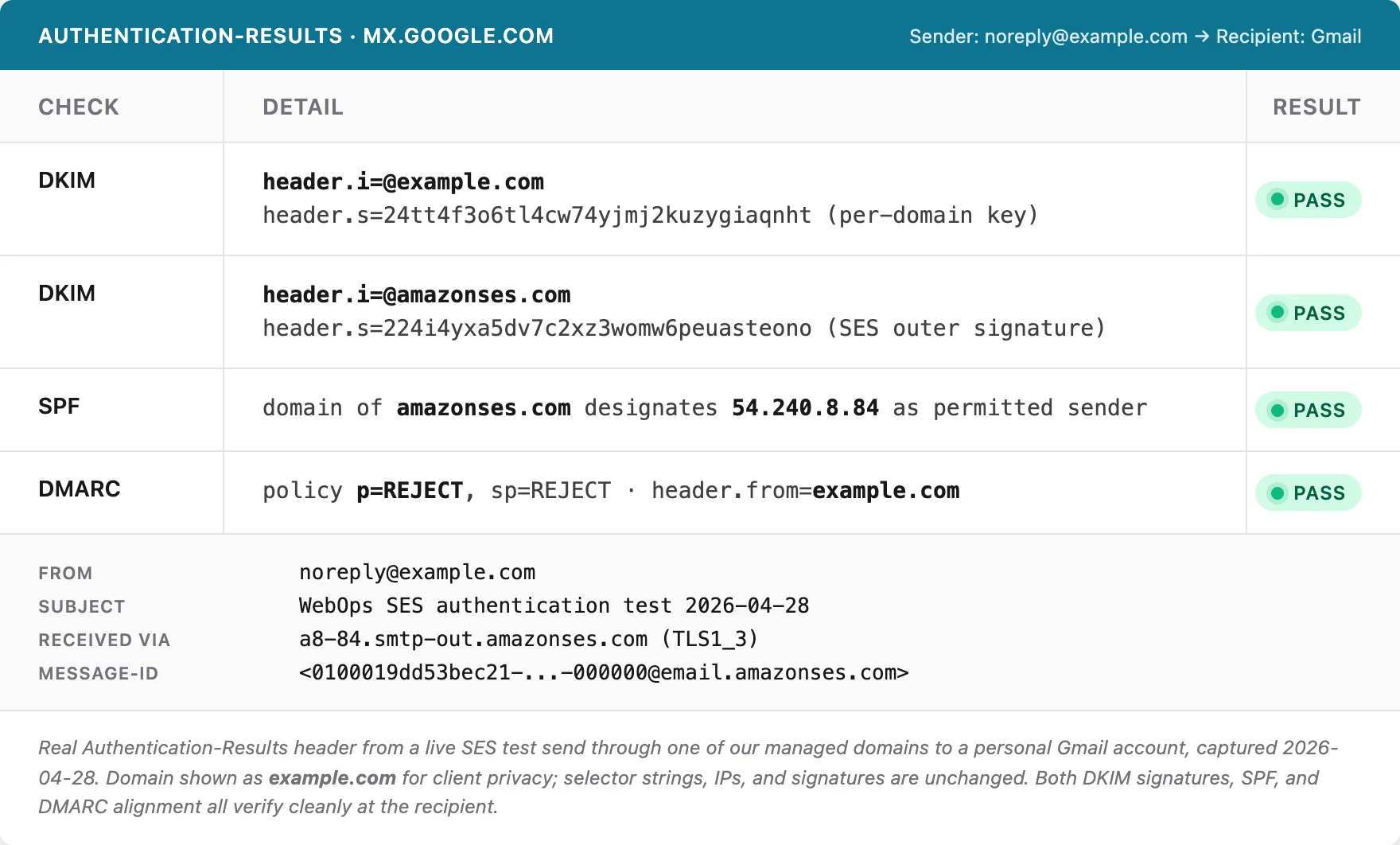
Two DKIM signatures pass independently. SPF aligns with the SES sending IP. DMARC aligns with the From header. The strict p=REJECT policy is published and honored. This is what authenticated, isolated sending looks like at the recipient.
Is this you?
If you run a WordPress site somewhere other than WebOps, three quick questions will tell you whether your hosting company's email setup is the kind we just described.
- When you send a test email to a Hotmail or Outlook.com address from your contact form, does it land in the inbox or in junk? Junk-folder delivery to Microsoft addresses is the most common symptom of a shared-IP reputation problem.
- Does your hosting account give you per-domain DKIM keys, or are you sharing a sending identity with every other customer? If you can't find DKIM CNAME records in your DNS that resolve to your own domain, you're on a shared identity.
- If your SMTP credentials leaked tomorrow, what's the blast radius? One mailbox? Your whole hosting account? Every customer on the platform? The answer tells you how the credentials are scoped.
If any of those answers made you uncomfortable, the fix is the same one we built for our own fleet: per-domain sending identities, scoped credentials, and infrastructure that treats each domain's reputation as its own to defend.
Get in touch if you want to talk about email deliverability, or anything else about your hosting setup. We've been managing WordPress infrastructure for 18 years, and we're happy to help you figure out whether your current setup is working as well as it should. Take a look at our managed WordPress hosting plans to see what's included.

No comments yet. Be the first to comment!
Leave a Comment