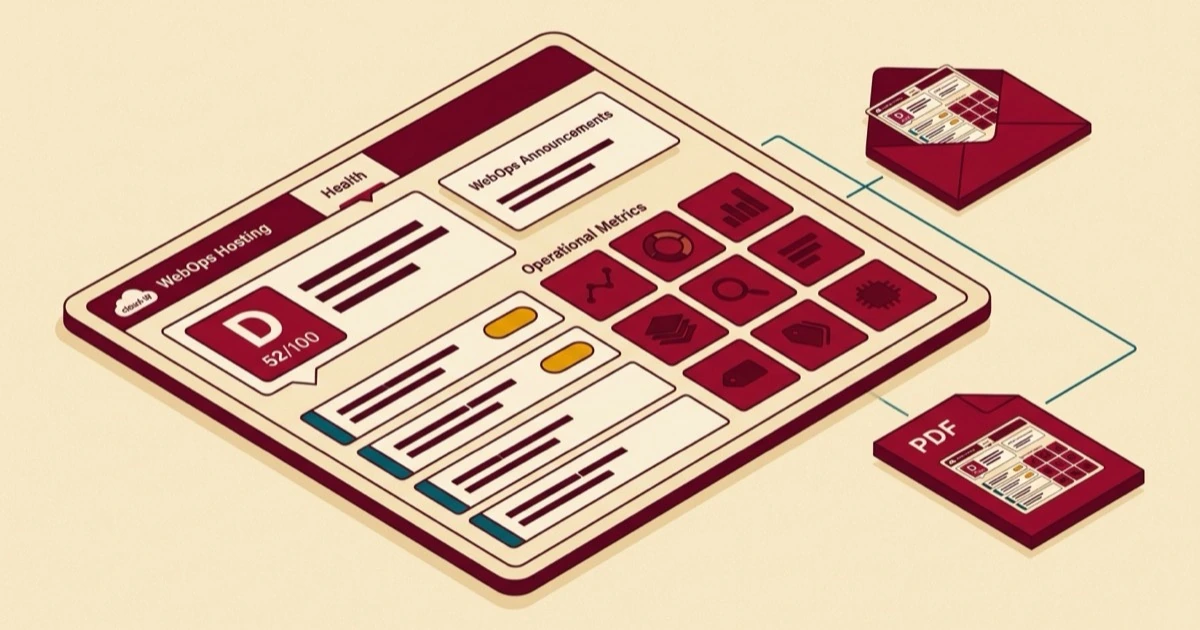
Field Notes from 2026-05-23. One new WebOps panel in every client's WordPress admin, with a Health tab front and center. Six live metrics at the top, a categorized audit below, refreshed every weekend, with each finding tagged to who handles the fix.
If you log into your WordPress site this week, there is a new WebOps icon in the WordPress admin sidebar. Click it and a panel opens with a row of tabs across the top, led by Health and a new Work Performed log and an Included Plugins tab, with Information, Tools, and Display alongside. The Health tab opens by default. You will see a row of six tiles across the top with live numbers for your site: visitors over the last 90 days, uptime for the last 30, security events handled this month, off-site backups retained, search traffic trend, and the current state of your WordPress core, theme, and plugin inventory. Below the tiles is a list of findings from this week's audit, sorted into categories, each one telling you who handles the fix.
That is the surface. The build behind it is the larger story, and we want to walk you through it, because it explains a thing about WebOps that has otherwise been quiet: we are not running a commodity hosting plan with a wrench tied to the side. We are running a product that watches the health of the business attached to the site, and we have just put a fair-sized chunk of that product directly inside the place you already log in.
Why this exists
Most small-business WordPress sites' real problems are not hosting problems. The site you are running is generally not sitting on a slow server. It is usually fast enough, secure enough, and online enough that the bottleneck is somewhere else. The bottleneck is that the site is invisible to search, or the security headers it ships with are loose enough that a passing scanner has a field day, or the contact form is silently rejecting legitimate submissions, or the email sent through it lands in spam because nobody set up DMARC correctly, or the content on three out of seven pages is too thin to convert anyone who does find it.
Hosting is the foundation. It is rarely the bottleneck. So we spent the better part of the last few months building an audit engine that surfaces those problems honestly, top to bottom, across every category of finding that we have seen actually move the needle on a small-business site. The output is a structured read of where your site is healthy and where it is not, with each finding tagged to the lane that fixes it.
That engine now ships on two surfaces, with more on the way. There is a free public form on our homepage that anyone can use to run the audit on any site. And there is the new Site Health tab inside the WordPress admin of every site we host, running the audit weekly and surfacing the findings where you already work. The shorter version of that whole paragraph: we built an honest audit, and we put it where the people who need it actually look.
What changes when you log in this week
The answer is a new WebOps panel inside the WordPress admin of every site we host, with Health as its lead tab. We took a page from WP Engine's playbook on this. They pioneered the pattern of giving the hosting company a real presence inside wp-admin instead of leaving the relationship at the billing portal, and we owe the surface design to them. What we built on that surface is meaningfully bigger than the precedent, but credit where it is due for the idea of meeting clients where they already work.
The Health tab does three things.
It shows you the operational state of your site at a glance. The six tiles at the top are first-party numbers, pulled from the analytics we install on every site, the uptime monitoring we run on every domain, the security tools that ship with the hosting plan, the off-site backup manifests we keep in cold storage, the search-engine reporting we have connected for you, and the WordPress inventory we already track for updates. None of those numbers come from a third-party scraper guessing about your site from the outside. They are your actual numbers, as we see them from inside the hosting stack, refreshed weekly.
It shows you the findings from this week's audit, organized by what fixes them. Below the tiles is a categorized list. Each finding has a status badge that does one of two things: it tells you the issue is already handled by your hosting plan, or it points you to one of our specialty services that handles that lane. A missing DMARC policy and a missing meta description are both findings, but they belong to different remediation paths, and we tag each one accordingly so you are not left guessing.
It mirrors itself in your inbox every week, and as a PDF if you want one. The same layout you see in wp-admin lands as a weekly email designed to be readable on a phone, and the same content is available as a PDF report you can save, forward, or hand to whoever else looks at your site. Three surfaces, one source of truth, identical numbers in all three.
The other tabs in the panel each have their own job. Work Performed is a running log of the updates, optimizations, and fixes we have carried out on your site, the same maintenance record that appears in your monthly report, now visible live. Included Plugins shows the premium, agency-licensed plugins already running on your site and the full library your plan includes — what you have, what you can add, no separate bill. Information surfaces the operational metadata for your site, the kind of detail you would otherwise have to dig through admin screens to find. Tools exposes a handful of operational actions for sites that want them. Display controls a couple of admin-area presentation options. Portal is a one-click jump into your WebOps client area when you need it. Alongside the Health tab, the panel also includes a WebOps Announcements widget that will start surfacing platform updates and changelog notes from our published announcements. It's empty today; the channel exists.
Each finding tells you who fixes it
The categories the audit walks through are the seven we kept seeing in those thousands of free reports, in roughly the order most sites need them: Security, Performance, Speed Optimization, Search Visibility, Content, Privacy, and Analytics. Each one has its own kinds of finding, and each finding gets routed to the right lane.
A large fraction of the findings, across every site we have run this on so far, route back to your hosting plan itself. Baseline performance, plugin and theme version drift, core updates, caching configuration, SSL renewal, uptime, default email authentication, off-site backups: all handled. When the audit surfaces one of those, the badge next to the finding says so, and there is no upsell attached. The point of putting your hosting on a real product is that hosting itself becomes synonymous with a healthy website. If we surface a hosting-baseline finding and it is not already taken care of, that is on us to fix, not on you to buy something.
The other categories are where the specialty services come in. Findings about email authentication beyond the defaults, security headers, fingerprint reveals, malware or blocklist hits all route to our Security Assurance service. Findings about page speed and Core Web Vitals that go beyond what the LiteSpeed baseline can resolve, the per-page Critical CSS work and JavaScript deferral and plugin-bloat audits that move a site from "fast enough" to actually fast, route to our new Speed Optimization service, which just opened this week. Findings about thin pages, broken outbound links, missing alt text, or content that needs reorganizing route to Content Operations, which is also where you go when you just want changes made on your site without doing them yourself. Findings about cookie consent, privacy policies, and tracker disclosure route to Privacy Compliance. Findings about Google Analytics, tag manager configuration, conversion tracking, and pixels route to Analytics & Tags. Findings about search visibility have their own lane that we will say more about in a separate post in the next few weeks.
All five of those specialty services are live and available today. You do not have to wait for any of this to be built. The audit is telling you which of them apply to your site right now, and the activation paths are inline in the panel itself.
Three surfaces, one source of truth
The reason the panel, the weekly email, and the PDF all exist is that different clients pay attention to their sites in different places. Some of you live in wp-admin and log in twice a day to publish something. Some of you have not opened the admin in six months because there has been nothing pressing to do there, and the only signal you want from your hosting company is a clean monthly summary in your inbox. Some of you are agencies or owners who need to forward a real report to a partner or a board, and the weekly email is too informal for that.
So we built all three from the same data, in the same layout, refreshed at the same time, with the same numbers in all three. The PDF is not a different report; it is the panel, rendered for print and email. The weekly email is not a marketing newsletter dressed up as a status report; it is the panel, rendered for an inbox. There is no version skew between them. If you want to know what the audit said this week, you can find out from whichever surface you happen to be on, and you will get the same answer.
The audit, public-facing
Anyone can drop their URL in the form on our homepage. The full audit runs, a report is emailed back. Tens of thousands of prospects have used it. It has been a quiet lead funnel for years.
What the reports kept telling us
Reading the corpus at scale, the same shape kept showing up. The hosting layer was usually fine. The bottleneck was elsewhere: search, security headers, content, mail authentication, privacy posture.
The audit, in your admin
Every client site now runs the same audit on a weekly cadence, with the findings surfaced inside wp-admin, mirrored to an email, and rendered as a PDF. Three surfaces, one source of truth.
Findings routed to fixes
Every finding lands in a lane: handled by your hosting, or routed to one of our specialty services. No more one-time PDFs that quietly age. The audit closes the loop.
Partner agencies get a partner-aware experience
A meaningful share of the sites we host are managed by partner agencies on behalf of their own clients. Those sites get a version of the Site Health panel that respects the partner relationship. There are no upsell calls-to-action pointing at WebOps services on the panel for agency-managed sites. Agencies do still get the Included Plugins tab on those sites — a plain view of the premium, licensed plugins included in the plan, so the full stack you draw on is visible rather than buried in a brochure. The agency sees the health data and handles remediation through whatever stack they already use. That is part of how we treat resellers as customers rather than as a distribution channel. We are running infrastructure for them; we are not trying to convert their clients underneath them.
If you are reading this and you run an agency hosting through us, the panel your end clients see is yours to brief on, and the routing is configured to match. If you want to talk through the agency-facing version in more detail, send us a note.
What this means for the way we run hosting
We have been at this for eighteen years. The version of managed WordPress hosting we sell now looks less and less like the version that was reasonable a decade ago. Putting a real product on top of the hosting plan, watching the actual state of every site we run, and routing findings into the hands of people who can fix them is the shape that managed hosting takes in 2026, and we wanted to be early to it.
If you are an existing client, log in this week and take a look. The first audit ran over the weekend, so what you see is current. If a finding is on the list and you are unsure what it means, click through; everything has a short explanation and a clear next step. If you would rather wait for the weekly email, that goes out on the same cadence and the picture will be the same.
If you are not a client yet and you want to see what your own site looks like through this lens, the free Website Health Report on our homepage runs the same audit and emails you the result. It is the same report your hosted sites will be seeing inside wp-admin every week, with the same categories, the same kinds of findings, and the same honest read of where the bottleneck actually is. If you like what you see and want this watching your site every week, our managed WordPress hosting plans are where the panel lives.
More on each of the specialty services in their own posts over the coming weeks. For now, the tab is there. Have a look.

No comments yet. Be the first to comment!
Leave a Comment