Field Notes from 2026-04-29. One Postfix log parser. Five mail layers watched. Zero silent failures we can't account for.
Your WordPress site sends more email than you think. Password resets. Contact form submissions. WooCommerce order confirmations. Appointment reminders. New user registrations. Every one of those emails is a small but critical piece of your business operations. If any of them silently fails to deliver, you may never know. Your customers will.
At WebOps Hosting, we monitor every email that every site in our fleet sends. Not in a vague check-the-logs-if-something-goes-wrong way. We built a custom mail monitoring system that tracks deliveries, bounces, and blocks across our entire infrastructure in real time. This post explains why that matters and what it means for your business.
When email is fire-and-forget
Most hosting companies treat outbound email as a commodity feature. Your server has Postfix or Sendmail installed, it can send email, and that is the end of their involvement. Whether those emails actually arrive in someone's inbox is, as far as they are concerned, not their problem.
This creates a dangerous blind spot. Email delivery is not binary. It is not simply "sent" or "not sent." An email can leave your server successfully and then be rejected by the recipient's mail provider. It can land in a spam folder. It can bounce because the address no longer exists. It can be silently dropped because your server's IP address ended up on a spam blacklist that nobody noticed.
For a small business, a single missed email can have real consequences:
- A missed contact form submission means a potential client who reached out and never heard back. They will assume you are not interested, or worse, not professional.
- A failed password reset email means a frustrated customer who cannot log in to their account and may give up entirely.
- An undelivered order confirmation means an anxious WooCommerce customer wondering if their payment went through.
- A bounced appointment reminder means a no-show that costs you time and revenue.
The worst part is the silence. When emails fail, there is usually no error message, no alert, no indication that anything went wrong. The email just disappears into the void, and you have no idea it happened.
What we built
We built a custom fleet-wide mail monitoring system called mailmon that parses Postfix mail logs across every server in our infrastructure. It is not a third-party plugin or a SaaS dashboard. It is a purpose-built tool that gives us complete visibility into email delivery across our entire fleet.
Here is what it tracks.
Delivery metrics
Every email sent from every site is logged with its delivery status. We can see at a glance how many emails were sent, how many were delivered successfully, and how many bounced. Across a typical monitoring period, our fleet handles thousands of outbound emails, and we maintain a bounce rate well under 1%, a number that would make most email marketing platforms envious.
For context, the industry considers a bounce rate under 2% to be acceptable for marketing email. We achieve a fraction of that for transactional email, which is a direct result of active monitoring and maintenance.
Bounce analysis
Not all bounces are created equal, and understanding the difference matters for how we respond.
Hard bounces indicate a permanent delivery failure. The email address does not exist, the domain is invalid, or the recipient's mail server has explicitly rejected the message. Hard bounces require action, usually updating the email address on file or investigating why a recipient's server is rejecting our mail.
Soft bounces are temporary issues. The recipient's mailbox is full, their server is temporarily unavailable, or there is a transient network problem. Soft bounces usually resolve on their own, but patterns of repeated soft bounces to the same destination can indicate a deeper issue.
Our monitoring system categorizes every bounce automatically, so we can focus our attention on the hard bounces that require intervention while keeping an eye on soft bounce patterns that might indicate emerging problems.
Provider block detection
The major email providers (Gmail, Outlook, Yahoo) each have their own reputation systems and filtering rules. A server IP that delivers mail flawlessly to Gmail might be blocked by Outlook, or vice versa. These blocks can be triggered by a single compromised site sending spam, by a sudden volume spike that looks suspicious, or by reputation scoring algorithms that no one outside those companies fully understands.
Our monitoring system identifies when specific email providers start rejecting mail from our servers. This early detection is critical because provider blocks tend to escalate. If you do not notice and address the initial rejection, the block can expand from a temporary deferral to a permanent blacklisting that takes days or weeks to resolve.
Blacklist monitoring
Spam blacklists, maintained by organizations like Spamhaus, are the nuclear option of email filtering. If your server's IP address appears on a major blacklist, a significant percentage of your outbound email will be rejected across many providers simultaneously.
We check every server IP against Spamhaus and other major blacklists regularly. All of our server IPs are clean, and we intend to keep them that way. When you share a server with hundreds or thousands of other sites (as you do on most shared hosting), you are at the mercy of every other site on that server. One compromised WordPress installation sending spam can get the entire server's IP blacklisted, taking your perfectly legitimate email down with it.
Because we run a managed fleet with active security monitoring (including bot protection, firewall management, and plugin vetting), the risk of a compromised site polluting our IP reputation is dramatically lower than on commodity shared hosting.
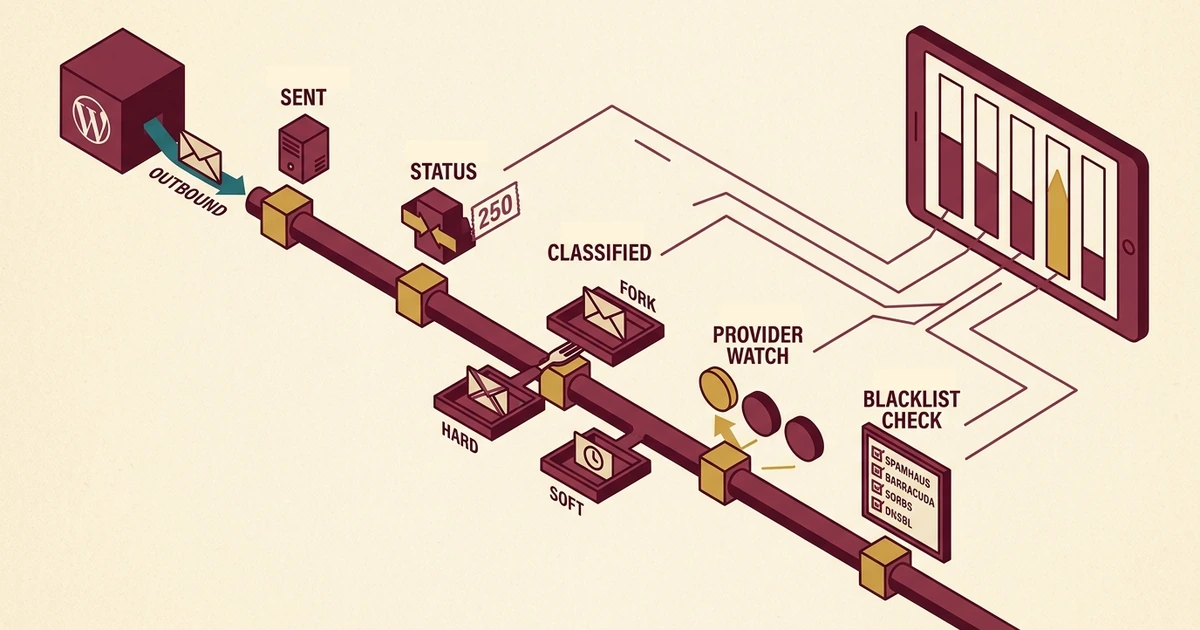
How a single email moves through the monitor
The capabilities above sound like a list of things mailmon can do. They are also a pipeline. Every outbound email runs through the same five-stage path on the way to "we know what happened."
Postfix logs the handoff
WordPress hands the email to Postfix or routes it through SES. Either path produces a log entry with a queue ID, recipient address, and timestamp. That log entry is the start of the audit trail.
Status attached to every send
The receiving mail server returns a status (250 accepted, 4xx soft bounce, 5xx hard bounce). Mailmon attaches that status to the original send so every email has an outcome, not just a "we tried."
Hard versus soft, with action triggers
Hard bounces flag the address for review. Repeated soft bounces to the same destination raise a separate signal. Quietly ignored bounces become tracked work items, not stale log noise.
Per-provider rejection patterns surface
Mailmon groups rejections by destination provider (Gmail, Outlook, Yahoo, corporate filters). When a single provider starts rejecting our mail, we see it before the block escalates from temporary deferral to permanent blacklisting.
Regular IP audits against Spamhaus and friends
Every sending IP gets checked against major blacklists on a schedule. A listing is treated as an incident, not a footnote. Combined with stages 1 through 4, we know not just whether email is failing but why.
From fire-and-forget to fully logged
Before we built this system, email sending from our fleet was essentially fire-and-forget. A site would hand an email to Postfix, Postfix would attempt delivery, and unless someone specifically went looking through the mail logs, the result was invisible.
That is how most hosting still works. To be fair, it works fine most of the time. The problem is that "most of the time" is not good enough when the failures are invisible. You might go months without realizing that 5% of your contact form emails are bouncing because a recipient's corporate mail server changed its filtering rules. You might not notice that password reset emails to Gmail users started landing in spam after a provider policy change.
After deploying mailmon, we have a complete audit trail of every email sent across our fleet. We can tell you:
- How many emails your site sent in any given period
- What percentage were delivered successfully
- Which specific emails bounced and why
- Whether any major email provider is currently blocking or deferring our mail
- Whether any of our server IPs appear on spam blacklists
That level of visibility transforms email from a black box into a managed service.
Where this fits in the email stack
Mail monitoring is one piece of a larger email infrastructure strategy. It works alongside two other systems to ensure reliable email delivery.
Per-domain sending identities
Earlier this spring, we migrated the entire fleet to per-domain Amazon SES sending identities. Every domain we host now has its own authenticated, reputation-isolated delivery pipeline. A bad neighbor on a shared IP can no longer drag your deliverability down. Mailmon covers both Postfix (direct server sending) and SES-routed email, so regardless of which delivery path your email takes, we have visibility into the result.
Email authentication (DMARC, SPF, DKIM)
We rolled out DMARC authentication across our entire fleet with a strict reject policy. If someone tries to spoof your domain by sending email that pretends to come from your business, the recipient's mail server will reject it. DMARC also generates reports that tell us when spoofing attempts occur, giving us visibility into threats against your brand that most hosting clients would never know about.
SPF and DKIM records ensure that legitimate email from your site is properly authenticated, which significantly improves deliverability. Email providers are increasingly penalizing unauthenticated mail, and many corporate mail servers reject it outright.
Together, monitoring, dedicated sending, and authentication create a comprehensive email infrastructure that most small businesses would otherwise need to hire a dedicated email operations specialist to achieve.
What 1% delivery failure actually means
Email deliverability is one of those concerns that feels abstract until it bites you. Most business owners do not think about whether their hosting company monitors email delivery. They assume it just works. For the most part, it does.
The failures are what matter. A 99% delivery rate sounds great until you realize that 1% represents real emails to real people that never arrived. If you send 500 emails a month from your WordPress site (which is not unusual for an active business with contact forms, user accounts, and automated notifications), a 1% failure rate means five emails per month that silently disappear.
Over a year, that is 60 missed communications. How many of those were potential clients reaching out through your contact form? How many were customers trying to reset a password before making a purchase? You will never know, because the defining characteristic of email delivery failure is silence. The same operating model that surfaced six WordPress sites silently running without their object cache applies here: silent failures are the ones we want to see first.
We would rather have the data and find that everything is working perfectly than not have the data and hope for the best.
What other hosts don't monitor
To be blunt: most hosting companies do not monitor outbound email delivery at all. They provide SMTP service as a checkbox feature, and their involvement ends there.
Some premium managed hosting providers offer basic email logging, but fleet-wide bounce analysis, provider block detection, and automated blacklist checking are not standard features at any price tier we have seen. These are operational capabilities that require custom tooling and ongoing attention. Mail monitoring is a sibling discipline to fleet-wide spam monitoring; both depend on actually reading the logs your platform is already producing.
This is not a criticism. It is a reflection of priorities. Most hosting companies are in the business of keeping servers running and websites accessible. Email delivery monitoring is an operations concern that falls outside that scope. We think it should be inside that scope, because for most small businesses, email is not a separate system. It is part of the website.
What this means for our clients
Like our server monitoring, email monitoring happens behind the scenes. You do not need to install a plugin, configure an SMTP service, or check delivery reports. We handle all of that as part of managing your hosting environment.
If you ever wonder whether your site's email is working correctly, we can pull the data and give you a definitive answer. If a client tells you they never received a form submission, we can trace exactly what happened to that email: whether it was sent, whether it bounced, and if so, why.
Your email infrastructure is included in every WebOps hosting plan alongside unlimited email accounts, $10,000+ in premium plugins, and real human support seven days a week. We do not charge extra for caring about whether your email actually arrives.
Is this you?
If you run a WordPress site somewhere other than WebOps, three quick questions will tell you whether your email pipeline has the kind of visibility that catches silent failures.
- Can your hosting company tell you how many emails your site sent last month, and how many actually delivered? Not "the server tried." Actual delivery confirmation rates from the receiving mail servers. If they cannot answer that question, no one is watching the outcome of your email.
- Would you find out the same day if Gmail or Outlook started rejecting mail from your server's IP? Provider blocks escalate quickly when ignored. Same-day visibility is the difference between a small reputation dip and a multi-day blacklisting.
- Are your server's outbound IPs being checked against Spamhaus and other blacklists on a schedule? If a neighbor's compromised WordPress site has put a shared IP on a blacklist, your password resets and order confirmations are silently disappearing. Routine checking is the only way to catch it before customers notice.
If any of those answers made you uncomfortable, the fix is to treat outbound email like any other production system: log it, watch it, alert on it.
If you are tired of wondering whether your WordPress emails are being delivered, or if you have been burned by missed contact form submissions and undelivered notifications, let us know. We are happy to discuss how our email infrastructure works and whether it is a good fit for your business. You can also review our managed WordPress hosting plans to see the full picture of what is included.

No comments yet. Be the first to comment!
Leave a Comment