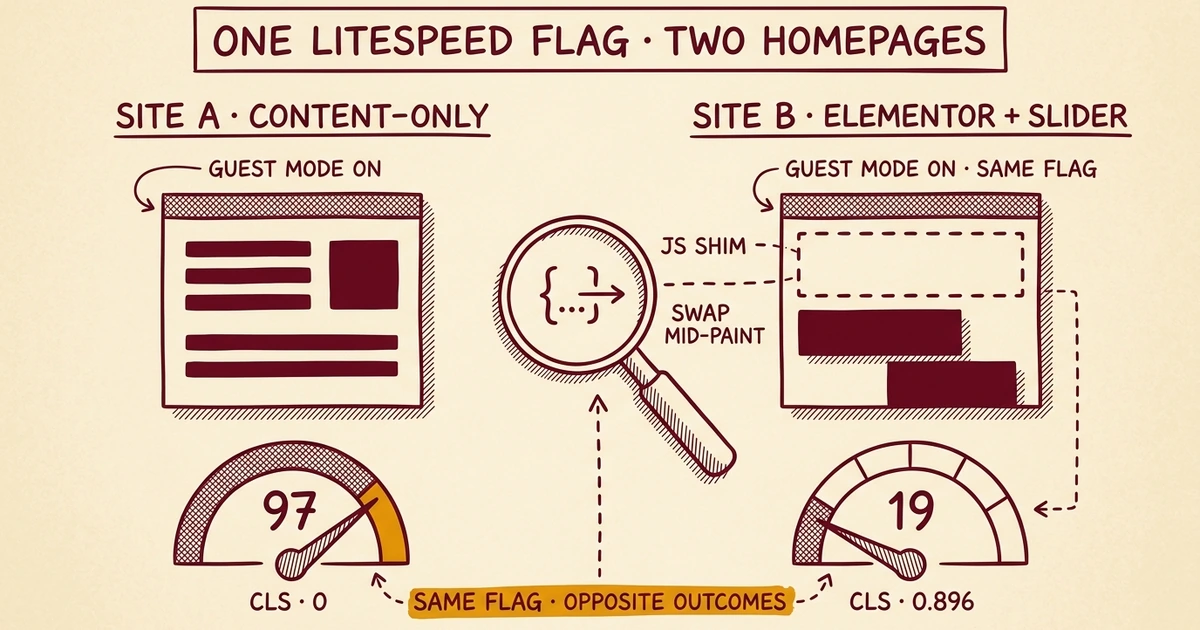
Field Notes from 2026-04-28. Two WordPress sites. One LiteSpeed Cache option flag. Wildly different outcomes, and a clearer picture of where WordPress performance optimization actually lives.
A week ago we rolled a fleet-wide LiteSpeed Cache baseline across 84 sites: combine OFF, defer ON, minify ON, the conservative shape that won't break on plugin updates. Most sites got faster. A few got noticeably slower. Those were sites that had been carefully hand-tuned to perform well already, where flattening them to the safe defaults cost real perceived speed.
The single biggest variable we didn't touch was Guest Mode. The team had hit a Gravity Forms breakage on it back on April 21, locked the script to keep both Guest Mode flags off, and moved on. So this morning we revisited it: was Guest Mode the missing piece for the laggards?
The answer ended up being more interesting than yes or no.
The setup
LiteSpeed's Guest Mode is two settings, not one. We treated them as one for too long.
litespeed.conf.guest(Guest Mode) precomputes a "first-time-visitor" version of every page and serves it from disk to anyone arriving without a session cookie. Search-engine crawlers, PageSpeed Insights, anyone clicking a link from another site for the first time. All of them bypass PHP and get the cached HTML. Pure cache layer.litespeed.conf.guest_optm(Guest Optimization) is a JavaScript layer that defers script execution until the user actually interacts with the page. Mouse moves, scrolls, taps. The theory: scripts that don't need to run for someone glancing at the page can wait until they engage.
The April 21 breakage was guest_optm. It was deferring the JavaScript that Gravity Forms needs at page load to bind handlers, validate inputs, and initialize reCAPTCHA. By the time a visitor clicked Submit, they were clicking a dead form.
The hypothesis going into today: leave guest_optm off, but flip Guest Mode on by itself. Get the cache-layer speed win without the JS-deferral form breakage.
Two canaries
We picked two sites on the same server, same client.
Site A. Content-only homepage. No Elementor, no slider, no forms above the fold. The homepage renders mostly as text and images.
Site B. Elementor-built. Hero slider on the homepage. Multiple forms across the site.
Both sites had the new conservative LiteSpeed baseline applied last week. Both had Guest Mode off. Both had a captured 3-run median PageSpeed score from before today.
Then we flipped Guest Mode on (both flags) on Site A and ran the median again.
Site A: +59 points
| Metric | Before | After |
|---|---|---|
| Mobile performance | 38 | 97 |
| Mobile LCP | 4,834 ms | 1,748 ms |
| Mobile CLS | 0.567 | 0 |
| Desktop performance | 47 | 86 |
The Cumulative Layout Shift score going from 0.567 to actual zero is the standout. CLS measures how much the page jumps around as it loads, like typing into a search box that suddenly shifts because an ad loaded above it. Hitting zero means the page renders to its final layout in one paint. That's the experience visitors notice without being able to name it.
This is the result the precision-fix hypothesis wanted: cache-layer Guest Mode delivering a near-perfect score on a content-shaped site.
So we went to Site B, but this time with only the cache-layer flag on. No JS deferral. Just Guest Mode by itself.
Site B: -31 points
| Metric | Before | After |
|---|---|---|
| Mobile performance | 50 | 19 |
| Mobile LCP | 5,131 ms | 5,431 ms |
| Mobile CLS | 0.087 | 0.896 |
| Mobile TBT | 476 ms | 796 ms |
Cumulative Layout Shift went the wrong way by an order of magnitude. The page now jumps significantly during load. Total Blocking Time (how long the main thread is locked up) got worse by 320 ms. The actual paint metrics (LCP, FCP) barely moved. The site got slower in every way that visitors actually feel.
What happened?
Guest Mode doesn't only serve a cached HTML file. It also injects a small JavaScript shim whose job is to detect when a real visitor (as opposed to a crawler) is on the page, fetch the personalized version via AJAX, and swap it in. That swap, on a site already rendering an Elementor hero with a slider initializing, fires partway through paint and re-arranges the layout. Hence the CLS regression. The cached file gets there fast. The page just doesn't stay where it landed.
Site A didn't have a slider. The swap-in JS still ran, but there was nothing complex to re-arrange, so it didn't visibly shift anything. Site B did. Same setting, opposite outcomes.
The general principle
WordPress sites aren't a single shape, and any given speed optimization is in a quiet conversation with whatever else the site is doing. Guest Mode interacts with sliders, lazy-loading, theme initialization, third-party scripts, font loading, and the order in which the browser paints. There is no setting on the LiteSpeed Cache page, or in any cache plugin, that is correct for every WordPress site by inspection.
The same is true of:
- Critical CSS / Used CSS generation. Nominally a pure win. Breaks on Elementor when per-post CSS gets cached against a since-modified template. Wonderful when stable; expensive to chase when it isn't.
- JavaScript Combine. A measurable win on HTTP/1.1. Largely irrelevant on HTTP/2 and HTTP/3 where requests multiplex over a single connection. Active liability when bundle hashes desync from cached HTML, which happens after every plugin update.
- CCSS, UCSS, Image WebP rewrite, Object Cache TTL. All similar. Defaults that work for one site cost real performance on another.
We took the conservative route in our fleet baseline because the alternative was breaking customer sites once a quarter when something incompatible got pushed. That was the right call for the baseline. It is also why some of our customers' sites are slower than they could be.
What we're doing about it
The conservative fleet baseline stays. Every site we host gets the speed features that are universally safe: page caching, browser caching, image lazy-loading and WebP conversion, JavaScript and CSS minification, deferred non-critical scripts, an HTTP/3 transport, and per-user Redis-backed object caching. That's a meaningful baseline. Most sites land between 70 and 90 on Lighthouse with just that.
For sites that need to score higher, or that have specific performance pressures (high LCP from a hero image, layout shifts from font swaps, time-to-interactive issues from a heavy widget stack), we've launched a paid Speed Optimization addon. The work isn't complicated, but it is site-specific: audit the actual page composition, identify which optional optimizations apply, test them, measure before and after, and re-test after every plugin update or theme change.
This addon shows up inside the new Site Health dashboard we just shipped to every site we host. When an audit identifies speed work that goes beyond what the baseline can resolve, the activation path is inline in the panel, alongside the same kind of routing for security, content, privacy, and the other lanes.
It's the same shape of work we already do for security on top of the baseline. Every site gets a hardened baseline; the customers who can't afford a breach pay extra for active monitoring and incident response. Speed is the same shape: every site gets the safe baseline, and the customers who care about the last 30 Lighthouse points pay for active tuning.
If you're running a WordPress site where speed is genuinely a business metric (checkout conversion, ad revenue, organic ranking) and the cache plugin's defaults aren't getting you there, ask us about it. The honest answer for your specific site might be that we already cover everything the safe defaults can do for you. It might also be that there's a 40-point Lighthouse gain hiding behind two settings nobody has tested on your homepage in two years.
The only way to know is to measure.
This post is part of our Field Notes series. Short writeups of operational findings from our managed WordPress hosting fleet. If you maintain WordPress sites yourself, the questions below are worth asking on yours:
- Has anyone measured PageSpeed Insights on your homepage in the last six months?
- Do you know whether Guest Mode is on or off on your site, and whether the answer is right for your homepage's composition?
- When you last installed or updated a major plugin (Elementor, WooCommerce, a theme builder), did anyone re-check whether your cache configuration still made sense after the update?

No comments yet. Be the first to comment!
Leave a Comment